Digital class register and absences
Record attendance and the topic of every lesson digitally and complete each entry with your signature.

Better insight into attendance and teaching with a digital class register for every class
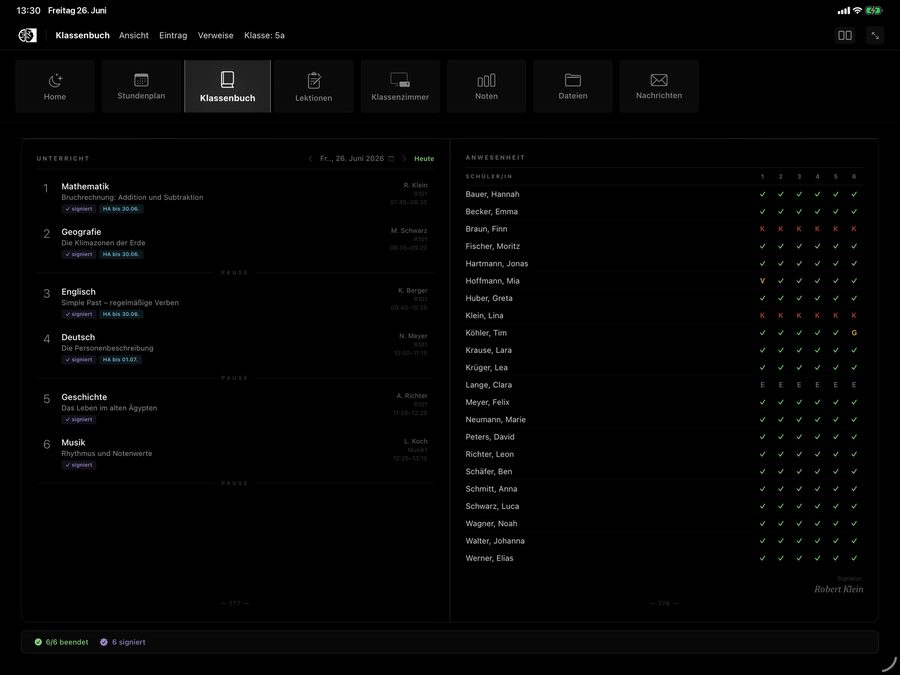
Run the class register straight from the timetable
The class register takes each class's lessons, including start times and breaks, from the timetable. Teachers open their lesson and add only what happened in class.
All governance and compliance applicationsLess admin during lessons
Mark the whole class present in one step, then record only the exceptions.
Always up to date
New entries and absences appear instantly for everyone who has the class register open.
Completeness at a glance
Spot from missing signatures which lessons are still open.
Class lists from one source
The class register uses the same classes and student lists as every other OhayoSchool application.
Assistant for the class register
Use the class register in conversation with the Ohayo Terminal, too.
Class register assistant
Ask in everyday language about a class's entries and sign open lessons right in the conversation. You confirm every write action before OhayoSchool carries it out.
Learn more about AI agentsExplore class register functions
Document teaching, attendance, and absences for your classes in one application.
Go back to earlier school days and see what was covered in each lesson.
Add a lesson's topic after class if there was no time for it during the lesson.
See in one table who was present in which lesson of the day.
Create the seating plan for the class and update it when students change seats.
See all absences in the current school year for every student.
OhayoSchool checks absences for possible violations of compulsory schooling, which you handle in the Incidents and emergencies application.
Resources
 OhayoSchool
Data protection in schools
Which obligations schools have when handling attendance records and other student data.
Read articleGovernance and compliance
All applications for documentation, reporting, and data protection.
Learn moreThe next step
OhayoSchool in action
Learn in a personal demo how OhayoSchool fits into the way your school works.
Frequently asked questions
Which devices do teachers use for the class register?
They use it in the browser, for example on a tablet in the classroom or a computer in the staff room. There is nothing to install.
Who can view a class's register?
Your school decides this through roles and permissions in OhayoSchool. Every change to an entry goes into a log that OhayoSchool files each month.
Where does OhayoSchool process class register data?
On servers in Germany. The class register assistant also uses only language models that OhayoSchool runs itself, and it sends no requests to external AI providers.
What does the class register cost?
The class register is part of the Administration package and included in the price per student per month. Accounts for teachers, office staff, and school leaders cost nothing extra. See pricing
Can I try OhayoSchool before I commit?
Yes. In a personal demo, we show OhayoSchool with the data of a sample school.