Lesson plans aligned with the curriculum
Build lessons from modules in conversation with OhayoSchool and have a script and exercises prepared for each lesson.

More structure in every lesson with modules and curricula in one place
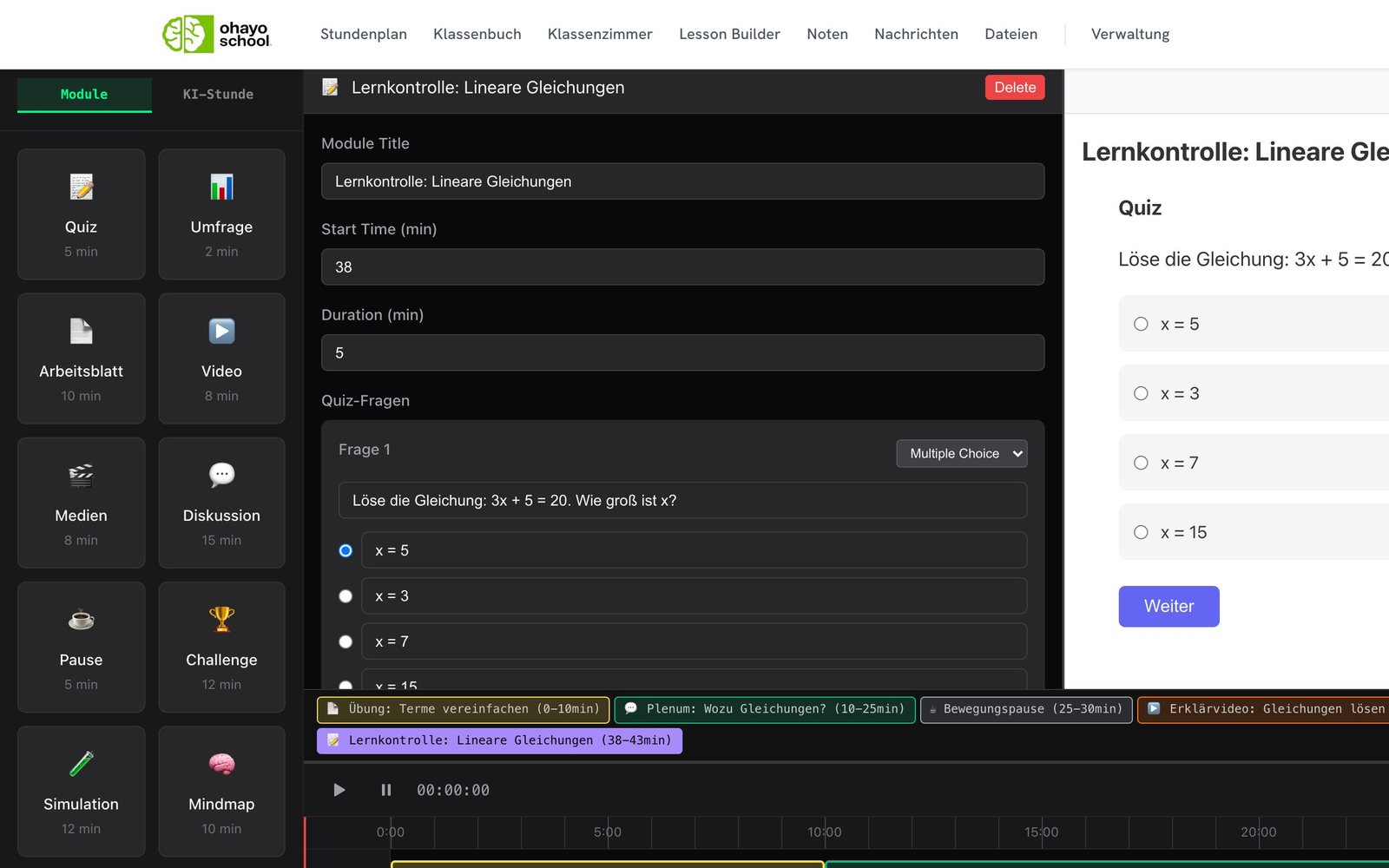
Plan every lesson on a timeline
In the lesson planner, you arrange a lesson's modules in teaching order. The timeline shows the whole lesson flow with the length of each module, and you change each part on its own.
All lesson design applicationsA draft to start from
Let OhayoSchool write the first draft and focus on fine-tuning your lesson.
Self-hosted language models
OhayoSchool processes your input on servers in Germany, with no requests to external AI providers.
Reuse what works
Save a successful module as a template and use it again in later lessons.
Straight into the classroom
Start the planned lesson in the digital classroom and release the modules there one after another.
Assistant for lesson planning
Develop your lesson with OhayoSchool, from the learning goal to the finished lesson flow.
Lesson planning assistant
Name the class, topic, and learning goal. OhayoSchool suggests a sequence of modules, which you change in conversation until it fits your class.
Learn more about AI agentsExplore lesson planner functions
Prepare the flow, script, and exercises for your lessons, with your school's curricula in the same application.
Add more modules or remove what no longer fits.
Save your lessons and open them again later, for example for a parallel class.
OhayoSchool writes a script that follows your lesson flow and that you can use as a guide in class.
Change the script directly in the text, and OhayoSchool saves every edit.
Have tasks created on the lesson topic and choose the ones that fit.
Get a suggested split of the class for group work, for which OhayoSchool uses only anonymized student IDs.
Store your state's education plans and your school's curricula for all teachers.
See for each class which content the curriculum sets out.
The curriculum assistant suggests the next topic from your class's curriculum, and you plan the lesson for it right away.
Add or edit entries when the requirements for a subject change.
Resources
 OhayoSchool
Digital classroom
Work together on the whiteboard and put individual students' contributions in the spotlight.
View applicationThe next step
OhayoSchool in action
Learn in a personal demo how OhayoSchool fits into the way your school works.
Frequently asked questions
Can I plan a lesson without a suggestion from OhayoSchool?
Yes. You put the modules together yourself and ask OhayoSchool for help only when you want to.
What is a module?
A section of the lesson in which the class does something, such as answering questions or working in groups.
Does every lesson have to run in the digital classroom?
No. You can also use a planned lesson as a draft and script for your own teaching.
What does the lesson planner cost?
The lesson planner is part of the Intelligence infrastructure package. It builds on the Administration package and is billed additionally per active student per month. Accounts for teachers, office staff, and school leaders cost nothing extra. See pricing
Can I try OhayoSchool before I commit?
Yes. In a personal demo, we show OhayoSchool with the data of a sample school.